Mobile PDF manager for on-device signing and page edits
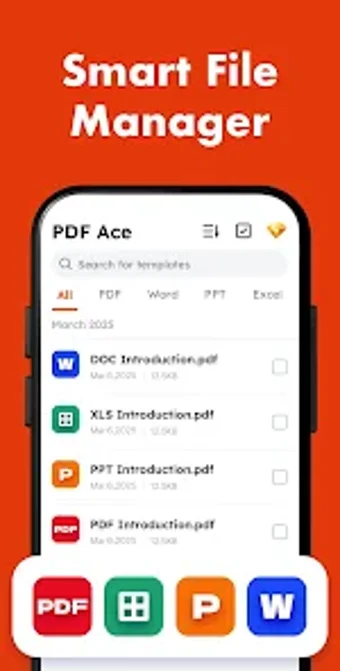
Try PDF Ace - Reader & Editor from MATRIX MOBILE PTE. LTD., a mobile PDF manager for reviewing, signing, and organizing documents on Android phones and tablets. The app centralizes high-speed viewing, electronic signature tools, and basic page-level editing into a single mobile workflow. It also converts images into PDFs and displays common office formats, aimed at students and professionals who need quick, private document handling on their devices.
What the app actually does on Android
PDF Ace functions as a portable document hub that renders PDFs quickly and handles basic page-level editing for combining, splitting, reordering, and removing pages. The app includes an electronic signature tool and an image-to-PDF converter for digitizing receipts and notes. It also supports viewing Word, Excel, and PowerPoint files and keeps a local history of recently opened files for faster retrieval.
Does it affect device performance during typical use?
The developer positions the app as lightweight and optimized for quick mobile document tasks on phones and tablets, which indicates a design target of modest resource use. Daily reading and small edits should fit normal mobile constraints. Large batch operations or very large PDFs may still depend on device memory and processor speed, so behaviour varies by handset capability rather than the app alone.
Is it safe to handle sensitive documents?
Privacy is explicit in the feature set: the app saves document history locally and does not upload that history to the cloud. This local-only history reduces exposure of recently opened files. The presence of an electronic signature tool keeps signing within the mobile environment, and the developer highlights on-device handling as a distinguishing point.
Do I need technical knowledge to operate it correctly?
The interface is described as clean and the app bundles reading, signing, and page-level editing into one tool, so basic tasks use guided controls rather than low-level system changes. That design suits students and office professionals who want straightforward mobile document flows. More advanced or specialised editing workflows may still require desktop software.
Practical choice for mobile workflows, with a single trade-off
PDF Ace is a practical option for students and professionals who need on-device document handling and digital signing. The main trade-off is the absence of cloud-based history or sync features, limiting cross-device collaboration. For users prioritizing local privacy and compact mobile workflows on Android hardware, the app delivers predictable behavior and focused functionality for everyday document tasks.